School Events: Safe Sharing of Student Photos
Best practices for teachers and schools to clean photo metadata before uploading. Protect student privacy with safe photo sharing.
Best practices for teachers and schools to clean photo metadata before uploading
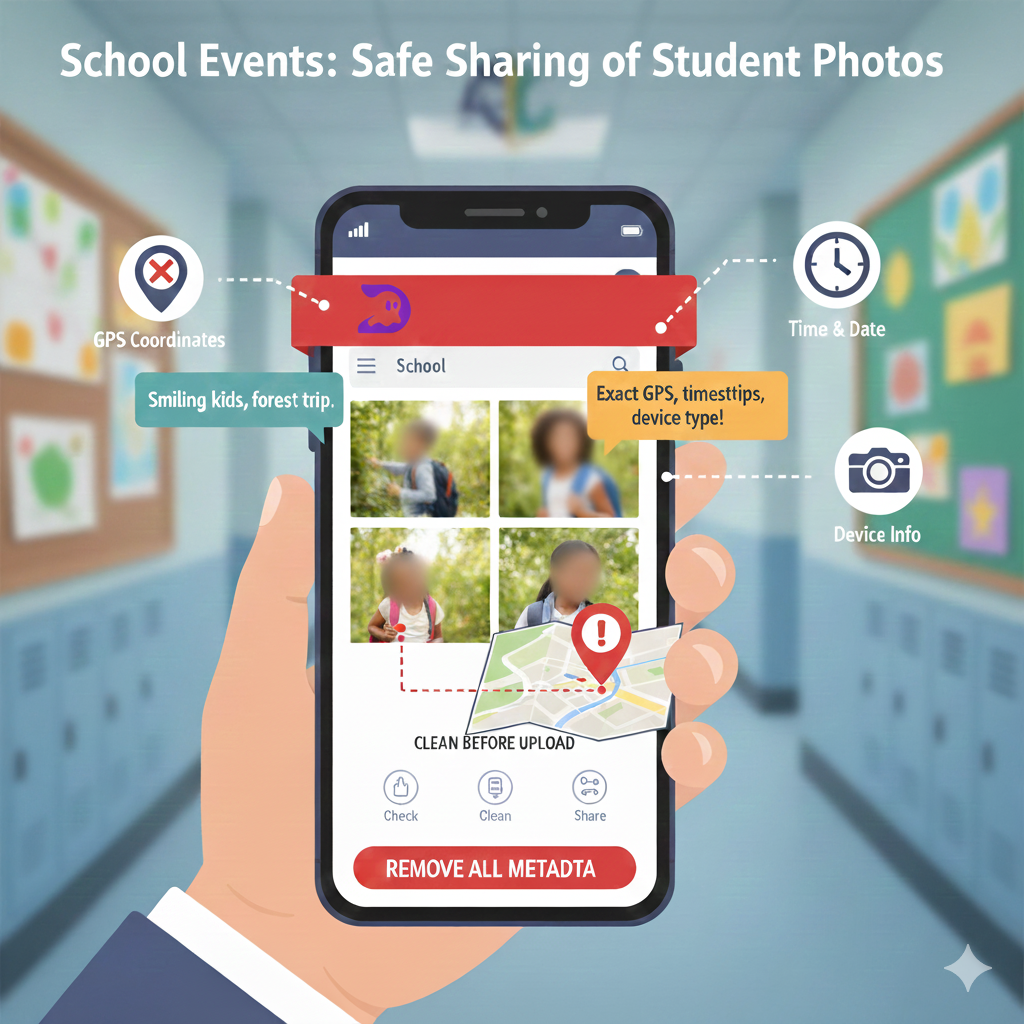
Imagine you upload a photo from a school trip to the school website. You see smiling kids, a forest in the background, backpacks everywhere.
Someone else might see something very different: exact GPS coordinates, the time the photo was taken, and the device type – that's photo metadata.
Would you be happy if a stranger could work out where your children live or where they spend their afternoons? If not, it's time to think about metadata privacy and safe photo upload, not just about "nice" photos.
What photo metadata actually is (and why it matters for schools)
Every image carries a small technical note attached to it. That note is called EXIF metadata.
It can include the time and date of the shot, the phone or camera model and location data from GPS. Put together, it behaves like a digital fingerprint for the photo.
For a school, this means that anyone who downloads the file can often tell where the children were, where the school is and when the building is likely empty. For parents, that's a safety concern. For schools, it's both a reputational and legal risk.
Real-world school situations where metadata bites
Let's make it concrete:
A class teacher uploads a trip album to the school's public Facebook page. Hidden in the EXIF are the GPS coordinates of the cabin where the class will sleep for the next two nights.
The school publishes photos from the robotics club on its website. From the image metadata you can tell which afternoons the rooms are full of laptops, cameras and other equipment.
A parent downloads a photo from a shared school folder and forwards it to relatives. Nobody bothered to remove GPS coordinates, so the home address is still inside the file.
It doesn't take a Hollywood hacker to read this. Basic tools are enough.
The real goal: share memories, not raw data
The goal for schools is simple to state, but easy to forget: share photos, without sharing coordinates, timing patterns or unnecessary personal details.
In practice, that means you:
- remove metadata from photos before uploading,
- keep names of children, classes and addresses out of file names and captions when you can,
- set clear rules for who takes pictures and who is responsible for metadata cleanup.
The good news? With the right process, this doesn't require an IT department or a big budget.
A simple 5-step workflow for teachers
Below is a workflow you can teach to any staff member. Think of it as the "belt and braces" routine before photos go online.
1. Check if your photos contain EXIF metadata
On your phone or computer, open the file information or "Details" view. If you see fields like Location, GPS or Camera model, you're looking at image metadata.
If you don't want to install software, an online checker can help – just be careful with very sensitive photos. Ideally, pick a tool that offers full in browser cleanup, so the photo never leaves your browser during the process.
2. Remove location data and other sensitive bits
Your main priorities are to:
- remove location data,
- hide GPS location,
- and, if possible, remove camera info, because parents rarely need to know which phone took the picture.
Editing EXIF fields one by one is painful and error-prone. Use a metadata remover or metadata scrubber that can handle EXIF removal for many photos in one go instead.
3. Use a tool that doesn't store school photos on a server
For schools, the safest option is a metadata removal tool that works directly in the browser. No uploads to third-party servers. A clear privacy policy you can show parents.
That's exactly the approach of DropTidy: an online metadata remover with full in browser cleanup, so the browser does the work and the tool never keeps your files.
[Tip: add a screenshot here showing "before vs after" metadata in DropTidy.]
4. Then (and only then) upload your "clean" photos
Once you have clean photo metadata, you can decide:
who should be able to see the pictures (public page vs parents only), where to publish them (school website, EduPage, private gallery), and whether file names are neutral or not.
"3A_Misko_Novak_in_front_of_house.jpg" is not neutral. Aim to share photos without location and without student names in file names – this is what real secure photo sharing looks like.
5. Turn the workflow into a school standard
The most common failure pattern? One enthusiastic teacher does all this for "their" class, and nobody else follows.
So write it down and make it official. Add remove metadata from images into the school's IT or GDPR guidelines, show the process at a staff meeting and appoint one person (often the ICT coordinator) to own the checklist.
Once it's written into the routine, it becomes normal – like asking for consent forms before a trip.
FAQ: What teachers and schools keep asking
"Do we really need to care about EXIF metadata if the photos are only on Facebook?" Yes. The platform can still use metadata for profiling or keep it internally. It's safer to strip EXIF data before you hit "Post".
"Isn't parental consent for photography enough?" Consent covers whether you may publish a child's picture. It doesn't say anything about invisible technical data travelling with it. Remove personal data from photos is a separate, technical step.
"This sounds complicated. Who has time for that?" With a good tool, it's far from complicated. Solutions like DropTidy let you remove metadata from pictures for an entire album in seconds. Honestly, it can be quicker than getting the kids to stand still for the group photo in the first place.
How DropTidy fits into a school's privacy routine
DropTidy is built as a lightweight metadata removal tool for teachers who need a quick win, not a 30-page manual.
It offers:
an EXIF cleaner that runs directly in the browser, fast remove metadata from photos for dozens of files at once, no server uploads – a true full in browser cleanup, and a strong focus on protect photo privacy.
Here's how it looks in practice. A class teacher drops their trip photos into DropTidy, runs a clean photo metadata pass, saves the new versions and uploads those to the school website. From start to finish, it usually takes less time than it takes the children to line up in pairs and stop giggling.
If you want to try it, visit DropTidy.com and run a few test images before your next event.
Quick pre-upload checklist for safe school photos
Before you publish your next batch of school photos, ask:
- Did we remove location data and GPS geotagging?
- Are children's names and classes gone from file names and visible captions where possible?
- Did we use a remove metadata from images tool that doesn't store photos on a remote server?
- Is it clear who processes and who publishes the photos?
If any answer is "I'm not sure", that's your next improvement point.
Final thought: school photos should feel like memories, not a map
School events are full of great moments. Parents want to see them and children love spotting themselves in the gallery.
But those memories shouldn't double as a digital map of their daily lives. With a few simple habits, you can bring metadata risk down to a level everyone can live with.
Try DropTidy on your next photo album. If you make clean photo metadata part of your school's standard, your students and their parents may never thank you out loud – but they'll sleep a little easier.
Try It Now
Ready to clean your travel pics? Visit DropTidy.com and drop in your files.
Have a metadata mishap or a favorite privacy tip for travelers? Leave a comment. Or just share your tip—and keep your location... only on the map, NOT in your metadata.
DropTidy: Made for creators who want clean photos and peace of mind.
FAQ: School Photo Privacy
Q: Does parental consent cover photo metadata?
A: No. Consent covers whether you can take and publish photos, but doesn't address metadata removal. Stripping GPS and EXIF data is a separate technical privacy step schools should take.
Q: Can metadata removal get us in trouble legally?
A: No. Removing metadata is a privacy best practice and aligns with child protection regulations. It reduces risk rather than creating it.
Q: What if we only share photos in private parent groups?
A: Even private groups can have security breaches or members who reshare content. It's safest to remove metadata before any digital sharing.
Q: Will this slow down our photo-sharing workflow?
A: With browser-based tools like DropTidy, you can clean dozens of photos in seconds. It's faster than most teachers expect and becomes routine quickly.
Q: Do screenshots of photos still contain metadata?
A: No. Screenshots create new files without the original metadata. However, they may contain visible information like location tags or timestamps in the image itself.

Written by droptidy
DropTidy helps you protect your privacy by removing hidden metadata from your photos. Learn more about keeping your digital life secure.
Related Articles
Journalists: Protect Your Sources When Sharing Photos
A practical guide to scrubbing image metadata before publishing. Protect your sources by cleaning image metadata with DropTidy.
Dating Profile Picture Safety: How to Hide Hidden Data in Your Photos
A quick guide for singles who don't want to share more than their smile

How to See the Metadata in a Photo
Ever posted a photo without a second thought? Learn what hidden data your images reveal and how to check and remove photo metadata on any device.